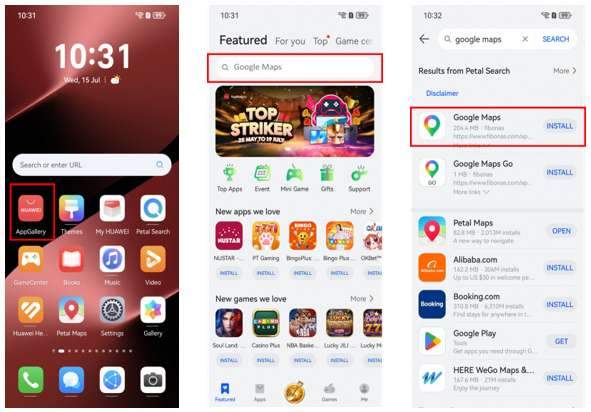
Getting lost at home is annoying. Getting lost just after landing in another country is much worse. Before travelling with a Huawei phone, it is worth checking how your maps, local transport and location-based apps behave on the exact device you plan to carry.
Do not wait until the airport to test maps
Open Google Maps before the trip and see what actually works. If your Huawei phone has Google Mobile Services, the native app may support the usual account features. On a phone without GMS, browser access can still be useful for searching places and planning routes, while some app-based features may be limited.
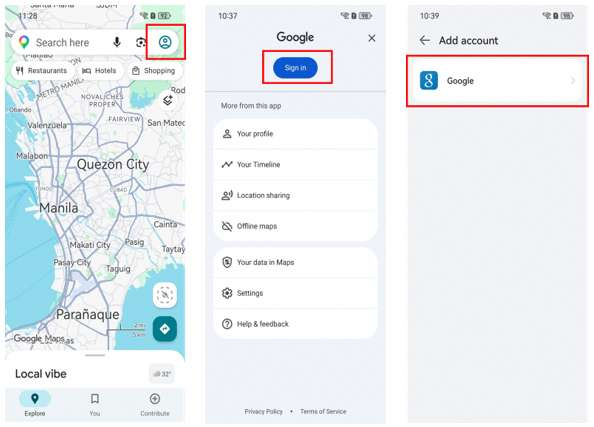
So when people ask does huawei have google maps, the useful follow-up is: what do you need it to do? Looking up an address is very different from relying on account sync, saved lists or a full navigation setup every day.
Keep a second map option ready
Petal Maps is built for Huawei’s ecosystem and can be a sensible backup when Google Maps is not the most convenient option on the device. Huawei support also documents a process for exporting starred places from Google Maps and importing them into Petal Maps.
If you have important hotels, offices or restaurants saved in Google Maps, moving those places before a trip is easier than rebuilding the list after you arrive.
Prepare for weak or expensive mobile data
Save hotel addresses, booking references and important locations somewhere outside a single map app. Take screenshots of complicated arrival instructions and download any offline information that your chosen map service supports.
After inserting a local SIM, check that location services still work and that ride-hailing or delivery apps can find your position. Public Wi-Fi may require a browser login page before map apps can reach the internet.
Use the setup that causes the least friction
There is no prize for forcing every Google service into a native app if the browser version already covers your needs. For many travellers, a home-screen shortcut to Google Maps plus Petal Maps for regular navigation is easier to maintain.
The Huawei Community page linked through does huawei have google maps explains the Google Maps question from the Huawei side. Test it before departure, keep a fallback map ready and make sure your local transport apps can use location correctly.