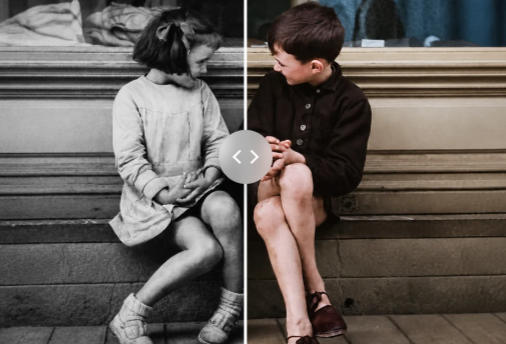
There’s a reason old black-and-white photos feel distant even when the people in them are family. Without color, a lot of context disappears, like the actual shade of an outfit, the season a photo was taken in, or the mood a scene was meant to carry. For most people, fixing that used to mean hiring someone to colorize photos by hand, which is slow and not practical for a whole album.
The free online image colorizer handles this automatically. Upload a grayscale photo, and the tool fills in plausible, realistic color based on what’s actually in the image, no manual painting or editing required.
What’s Actually Happening Behind the Scenes
Colorizing a photo isn’t just about applying a warm or cool tint across the whole image. The tool needs to understand what each part of the photo represents, like a face, a piece of clothing, a tree, or a brick wall, and apply colors that make sense for each of those elements individually.
This works through an AI model trained on massive sets of paired color and black-and-white photos. During training, the model learns the relationship between grayscale tones and the colors typically associated with them, things like skin tones, sky gradients, or foliage greens. When you upload a new black-and-white image, it applies that learned knowledge to estimate a believable color version, adjusting for shadows, lighting, and texture along the way.
It won’t always recreate the exact original colors, since that information isn’t recoverable from a grayscale image alone, but it produces a result that looks natural rather than artificially tinted.
Where This Tool Actually Gets Used
Restoring inherited or archived photo collections.
Old prints passed down through family members often exist only in black-and-white. Colorizing them makes the photos easier to connect with, especially for people who never experienced those moments firsthand.
Documentary and historical content work.
Writers, researchers, and creators working with archival photography sometimes need a color version to pair alongside the original for visual storytelling.
Social media and nostalgia-focused content.
Colorized versions of vintage photos tend to get more engagement than the grayscale originals, making this a quick way to repurpose old images for current platforms.
Photography hobbyists experimenting with restoration.
Anyone interested in photo restoration as a skill or hobby can use this as a starting point before doing further manual touch-ups.
No Cost, No Account Required
A lot of colorization tools either gate the final download behind a paywall or require creating an account before you can see the result. This tool skips both. The entire process runs in the browser, and the finished image is available without signing up or paying.
That’s a meaningful difference for someone who just wants to colorize a few inherited photos rather than commit to a service they’ll use once or twice a year.
Frequently Asked Questions
1.Does the tool work on very old or damaged photos?
A.It can process damaged or faded photos, but the quality of the original scan affects the result. Heavily degraded images with lost detail may colorize less accurately than clear, well-preserved photos.
2. Can I use this on scanned prints, or only digital black-and-white photos?
A.Both work the same way. As long as the scanned print is saved as a standard image file like JPEG or PNG, the tool processes it like any other grayscale upload.
3. How accurate are the colors compared to the original scene?
A.The tool generates a realistic estimate based on common patterns, not an exact historical reproduction. Elements like skies and skin tones tend to be close to accurate, while specific details like a particular shirt color are an educated guess.
4. Is there a limit to image size or resolution?
A.The tool is built to handle standard photo resolutions. Extremely large files may take longer to process depending on your connection and the image size.
5. Will this work well on group photos or busy scenes?**
A.Yes, though results can vary. Photos with clearer subjects and less visual clutter typically produce more consistent colorization than crowded or complex scenes.
6. Can I download the result for free?
A.Yes. There’s no payment or signup required to view or download the colorized image.
Try it here: Free Online Image Colorizer